Dubai-based founder building the next generation of tax software for global businesses. I started in the world of accounting and finance, built a successful tax and advisory firm (Alpha Pro Partners), and then turned those real-world pain points into a product: Tax Star, an AI-powered platform designed to make tax filing simpler, faster, and more accurate.
Xero vs Odoo: Which Is Right for Your UAE Business in 2026?

August 2, 2026


Content
A UAE business choosing between Xero and Odoo is not choosing between two versions of the same tool.
It is choosing between accounting software and a wider business platform.
Xero is clean, quick to use, and built around accounting. Odoo can handle accounting too, but it stretches much further into inventory, CRM, HR, manufacturing, ecommerce, and operations.
That difference matters in the UAE. VAT reporting, Federal Tax Authority requirements, foreign currency work, and the UAE’s 2026 e-invoicing rollout all affect the choice. A system that feels fine for basic invoicing may look very different once the business needs stock control, multi-entity reporting, or connected operations.
Here’s the straight answer: Xero fits businesses that need accounting done well. Odoo fits businesses that need accounting linked to the rest of the company. The right pick depends on where your business is now, and where it is likely to be in the next 24 months.
What are Xero and Odoo?
Xero is cloud accounting software founded in 2006. It now serves more than 4.9 million customers globally and is built for small businesses, sole traders, accountants, and bookkeepers. Its core strengths are invoicing, bank reconciliation, reporting, and app integrations.
Odoo began as TinyERP, later became OpenERP, and then moved into the Odoo brand as the product grew beyond classic ERP. Today it is an open source business suite covering accounting, CRM, ecommerce, inventory, HR, project work, point of sale, manufacturing, and many other business functions.
The main difference is simple:
- Xero does accounting
- Odoo does accounting and the wider operating system around the business
Odoo has an active UAE partner network, which matters for local implementations that need accounting, tax setup, inventory, or broader ERP work.
UAE compliance: VAT, FTA status and e-invoicing
VAT has applied in the UAE since 1 January 2018, with the standard rate set at 5% for most taxable supplies. Any accounting platform used by a UAE business needs to support VAT treatment, invoice records, and clean reporting.
Both Xero and Odoo can support UAE VAT work, but the current Federal Tax Authority vendor page gives a more precise view of software accreditation. As of the page update dated 19 May 2026, the FTA list shows Xero version 2026 with validity through March 2027. The same page shows an Odoo Middle East DMCC listing for Odoo version 17 with validity through June 2025, so any business relying on Odoo accreditation should verify the latest status before treating a specific setup as current.
Odoo does have a UAE fiscal localisation package. Its documentation says the localisation includes a local chart of accounts, UAE tax setup, currency exchange rate support, and invoice formats in English, Arabic, or both.
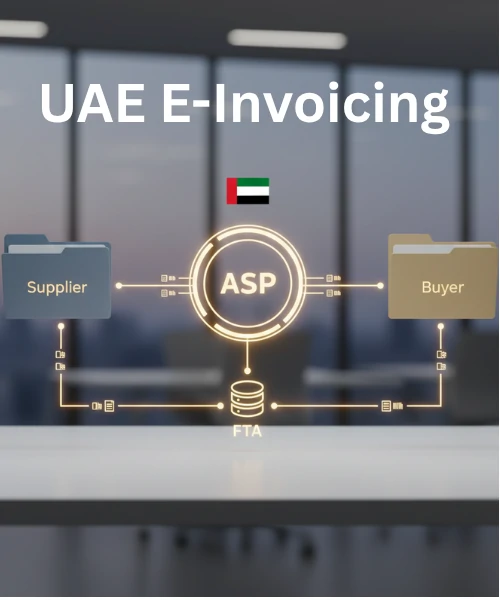
The UAE’s e-invoicing rollout creates another layer. The Ministry of Finance guidelines say the pilot programme and voluntary onboarding begin from 1 July 2026. Businesses need to connect their ERP or accounting applications with an Accredited Service Provider, test invoice exchange, and make sure the right data points can move through the system.
That means e-invoicing readiness is not just about whether a platform issues invoices. It is about whether the platform can work with the chosen ASP and carry the required invoice data properly.
Bank connections matter too. Xero lets users check available bank feeds from the Bank Accounts area, and Odoo lets users search supported banking institutions from its accounting dashboard. For UAE businesses, the exact bank should be checked before making a software decision.
Xero’s strongest day to day feature is bank reconciliation. Its product pages focus heavily on imported transactions, transaction matching, and reduced manual effort. Its automatic bank reconciliation feature powered by JAX has been rolling out in beta too. That matters for owners and finance teams that want quick month end cleanup.
Odoo stands out more on payables and operational finance. Its document digitisation can process vendor bills, and it can auto post digitised bills for selected suppliers. It too connects accounting more closely with purchasing, stock, sales, and other business workflows.
The multi company point matters for UAE groups. Odoo’s Custom plan includes multi company support in one database. Xero can handle multiple organisations, but those are still set up as separate organisations, with billing and reporting handled at organisation level or through extra reporting setups.
Reporting is another real split. Xero gives the core reports most SMEs need. Odoo goes further into pivot views, dynamic reports, and custom report building. That starts to matter more once a finance team wants deeper analysis by branch, business line, or workflow.
Xero’s current public pricing page shows Starter at $29, Standard at $50, and Premium at $75 per month before promotional offers. Its pricing page lists optional add-ons such as Expenses, Projects, and Analytics Plus. Multi currency is tied to higher level plans rather than the lowest entry path.
Odoo’s public site promotes US$24.90 per user per month for all apps, while its pricing page can display localised currency and billing terms depending on region. The One App Free plan supports unlimited users for one app. The Standard plan includes all apps. The Custom plan adds items such as multi company, Studio, external API access, and deployment options including Odoo.sh or on-premise.
The bigger pricing issue is total cost over time.
Xero often looks lighter at the start for a business that needs accounting, VAT support, invoices, bank reconciliation, and management reports. Once that business needs inventory systems, consolidation tools, or wider operational apps, costs can spread across several platforms.
Odoo can cost more to launch since implementation is a separate project. Its own pricing page says implementation services, training, data import, customisation, and development are outside the platform subscription. Yet for a 10 user trading business that needs accounting, inventory, and connected operations, the two year cost picture should be compared across the full software stack, not just the monthly licence.
Need help choosing between a lighter accounting setup and a wider ERP route? Alpha Pro Partners can review your current finance process, VAT workflow, reporting needs, and software gaps before you commit.
Ease of use and setup
xero is easier to get moving. It is accounting first, cloud based, and built around a clean interface. For a business owner or a small finance team, that usually means a shorter setup path and less training at the start. Its appeal is simple: you can move quickly and keep the books organised without turning software selection into a major project.
Odoo asks for more planning. That is the trade off of a wider system. If a business is setting up accounting, inventory, CRM, purchasing, workflows, and reporting together, the process needs structure. Odoo’s own pricing page points smaller companies to implementation services and larger firms to partner led projects.
That does not make Odoo a poor choice. It means Odoo needs a better implementation plan.
A simple way to view it:
- Xero works well when the business wants accounting active quickly.
- Odoo works well when the business wants finance tied into operations from the start.
Scalability and business scope
Xero is strong for accounting focused businesses. It works well for small and mid sized companies that need invoices, VAT records, bank feeds, reports, and app connections. It integrates with more than 1,000 third party apps, which gives businesses room to add tools as needed.
The ceiling appears when the company needs finance to connect deeply with stock, procurement, CRM, HR, manufacturing, or multi entity reporting. At that point, Xero can still work, but the wider stack becomes more dependent on integrations and extra systems.
Odoo scales in a different direction. The accounting module can sit beside inventory, purchase, CRM, ecommerce, HR, and manufacturing inside the same business platform. Its finance documentation covers multi company, multi currency, reporting, inventory valuation, and bank synchronisation within the wider ecosystem.
That creates a practical split:
- A 5 person consultancy staying lean for the next two years may get more value from Xero.
- A 15 person trading company planning to grow stock, purchasing, sales workflows, and reporting may save itself a future system change by using Odoo earlier.
That is the 24 month question the article should answer. The software should fit the business you expect to run, not just the business you ran last year.
Xero pros and cons
Xero pros
- Quick to set up for accounting led businesses
- Clean interface for owners and finance teams
- Strong bank reconciliation workflow
- More than 1,000 app integrations
- FTA vendor page currently lists Xero version 2026 as accredited through March 2027
- Good fit for SMEs that want accounting without a wider ERP project
Xero cons
- Multi currency sits on higher level pricing paths
- Wider operations depend on integrations
- Multi entity reporting often needs separate organisation handling or extra reporting setup
- The software structure is fixed compared with a highly configurable ERP
- Costs can rise once several add-ons and third party tools enter the stack
Odoo pros and cons
Odoo pros
- Accounting sits inside a wider business platform
- Native modules for CRM, inventory, HR, ecommerce, and manufacturing
- Document digitisation for vendor bills
- Multi company available in the Custom plan
- Strong reporting depth through pivot views and custom reports
- Cloud, Odoo.sh, and on-premise options through Custom
Odoo cons
- Setup needs more thought than a pure accounting tool
- Implementation work can add real upfront cost
- Paid plans charge per paying user
- Customisation can create a long term reliance on a specific implementation setup
- Businesses should verify current FTA vendor accreditation status before relying on a specific Odoo listing
Who should choose Xero, and who should choose Odoo?
Choose Xero if your business:
- Is an SME with straightforward accounting needs
- Wants to get operational quickly without a full implementation project
- Is managed by a non technical owner or a small finance team
- Does not need inventory, CRM, or HR software right now
- Mainly needs VAT filing support, invoicing, and bank reconciliation
- Wants a clean accounting system with predictable organisation based pricing
- Prefers to add other tools only when needed
Choose Odoo if your business:
- Expects to need inventory, CRM, or HR tools within the next 12 to 24 months
- Operates through more than one legal entity or needs stronger multi company handling
- Processes many vendor bills and wants digitisation workflows
- Needs custom reporting, pivot analysis, or deeper operating data
- Works in trading, manufacturing, distribution, or logistics
- Wants one connected platform instead of a stack of separate apps
- Can support a more serious implementation project from the start
This is the decision line:
Xero is the better fit for businesses that need accounting. Odoo is the better fit for businesses that need accounting tied to operations.
FAQs
Is Xero or Odoo better for UAE accounting?
Xero is usually the stronger pick for UAE businesses that want accounting, VAT support, bank reconciliation, and reports without a large setup project. Odoo makes more sense when accounting needs to connect with inventory, CRM, or multi company workflows.
What are the disadvantages of Xero?
Xero can become less convenient once a business needs stock, CRM, or multi entity reporting inside one platform. Multi currency sits on higher tier plans, and some deeper operational needs push businesses into added integrations or external tools.
How much does Odoo cost per month?
Odoo promotes a One App Free option and a public headline price of US$24.90 per user per month for all apps on its main site. Pricing pages can display different currencies or billing terms by region, and implementation services are priced separately.
Why does Xero feel expensive for some businesses?
Xero’s base accounting price can stay reasonable. The total cost rises when the business needs higher tier features, extra tools, Projects, Expenses, or separate apps for wider operations. This is why total stack cost matters more than the entry subscription alone.
Can Odoo replace Xero?
Yes, for businesses that want accounting inside a wider ERP environment. Odoo can handle accounting, receivables, payables, reporting, inventory, CRM, and other business functions in one platform. That does not make it the right choice for every SME, since the setup is heavier.
What accounting software is best for small businesses in the UAE?
For a small UAE business with simple finance needs, Xero is often the cleaner first choice. For a business with broader operational needs, Odoo can be a better long term fit. The choice should follow the business model, not just the monthly subscription price.
Does Odoo support UAE VAT?
Yes. Odoo has a UAE fiscal localisation package with local accounting setup, VAT support, exchange rate settings, and invoice output in English, Arabic, or both. Businesses should still verify the current FTA vendor accreditation status for the specific setup they plan to use.
Final view
Xero and Odoo are not fighting for the exact same customer.
Xero is right for a UAE business that wants accounting to stay simple, clean, and fast to manage.
Odoo is right for a UAE business that wants accounting linked to the rest of the operation.
If your decision is still close, Alpha Pro Partners can help review your current accounting process, VAT workflow, reporting needs, and expected growth path, so you choose a system that fits the business you are building.
.webp)
%20(1).webp)
.webp)
.webp)
.webp)

























.webp)
.webp)
.webp)
.webp)
.png)
.png)



.png)